
How to Create a Blueprint for a House, Step by Step
How to create a blueprint: write a program, sketch the layout, draw a measured plan, add elevations, notes and a title block. Free online options included.
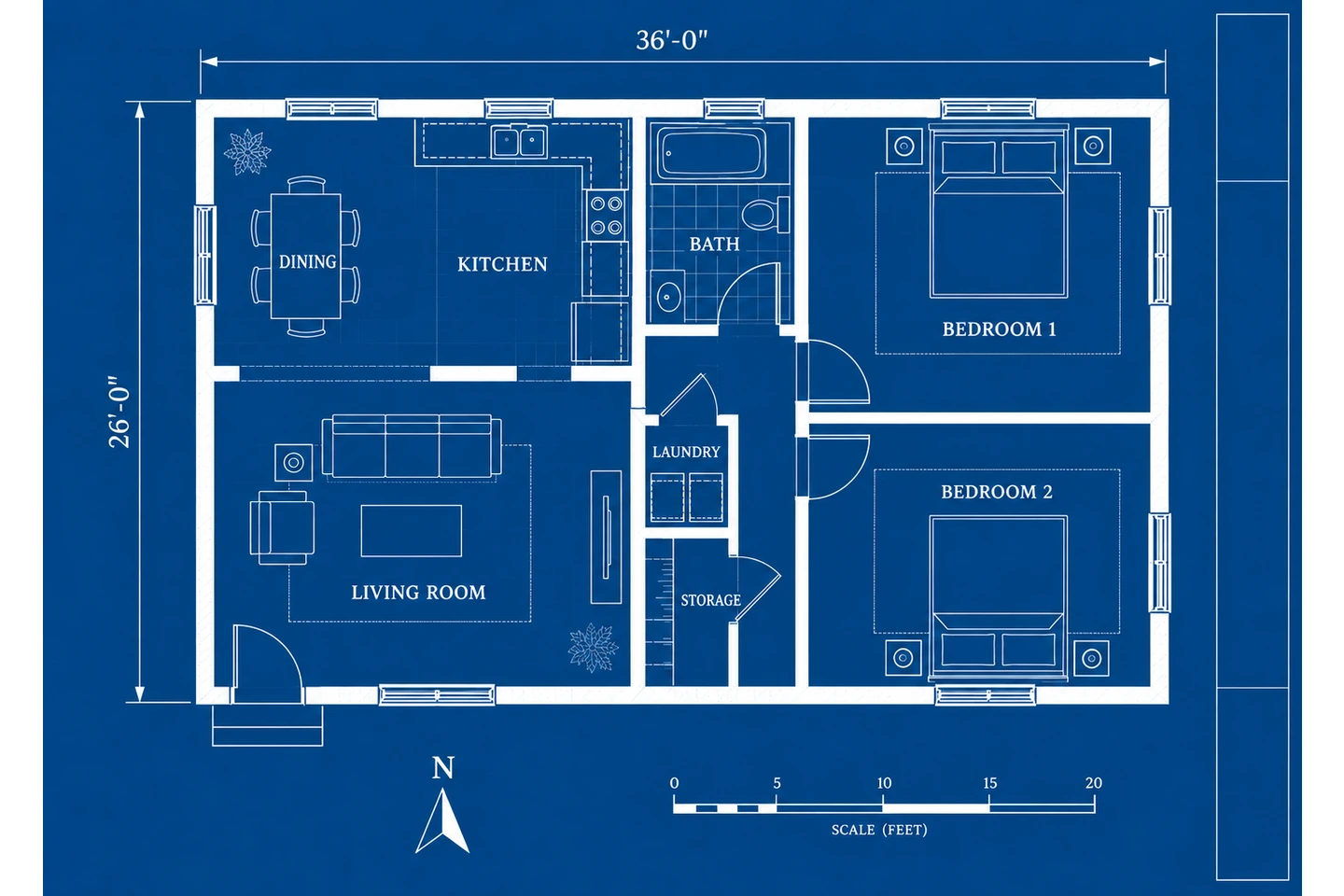
To create a blueprint, start with a program (the rooms and sizes you need), sketch how the rooms connect, draw a measured floor plan to scale, and then add what turns a plan into a blueprint: elevations and a section, dimensions, notes, and a title block with the scale on every sheet. Today "blueprint" means any set of construction drawings, usually printed black on white; the white-on-blue look survives as a style. You can make your own blueprints by hand, in free CAD software, or as a fast concept with an AI blueprint maker. Permit drawings must meet local rules, which often means a licensed designer, architect or engineer.
What a Blueprint Is Today
The name comes from a copying process. In 1842 John Herschel invented the cyanotype, a paper coated with iron salts that turns blue where light reaches it. Exposed under a drawing on tracing paper and then washed, it shows white lines on a blue ground. From the late 1800s it was the cheap way to copy building drawings, so builders called every set of plans "the blueprints".
Diazo prints with dark lines on a pale background replaced true blueprints in the 20th century, and today plans are drawn in CAD and printed or shared as PDFs. The word stuck: a builder or building department asking for your blueprints means the construction drawings, whatever their color. The white-on-blue style lives on for presentations, class projects and concept sheets.
Blueprint vs Floor Plan
Swipe left or right to see the full table →
| Aspect | Floor plan | Blueprint (construction set) |
|---|---|---|
| What it is | One top-down drawing of one level | A set of sheets describing the whole building |
| What it shows | Walls, doors, windows, rooms, sometimes furniture | Plans plus elevations, sections, site, structure, electrical, details and schedules |
| Used for | Layouts, furniture, listings | Permits, bids and construction |
| Who draws it | Anyone | Designers, architects, engineers; owners in some places |
To see how rooms fit together, a house floor plan is enough. If something is going to be built, you need the rest of the set.
What Goes on a Blueprint Sheet
Every sheet has a drawing area and a title block, and professional sheets carry the same elements:
- Title block: project name and address, sheet title and number (A-101), date, revisions, designer, and on professional sets the license stamp.
- Drawing titles and scales, such as FLOOR PLAN, SCALE: 1/4" = 1'-0", ideally with a scale bar.
- North arrow on every plan.
- General notes, including the code edition and standing instructions such as DO NOT SCALE DRAWINGS.
- Legend and abbreviations; see floor plan symbols and floor plan abbreviations.
- Callouts, tags and schedules: section markers, detail bubbles, and door and window tags keyed to tables of sizes and types.
Full-size residential sets are commonly printed on ARCH D sheets (24 x 36 in), with 11 x 17 in copies for the job site. Sheets are numbered by discipline: G general, C civil, A architectural, S structural, and M, E and P for mechanical, electrical and plumbing.
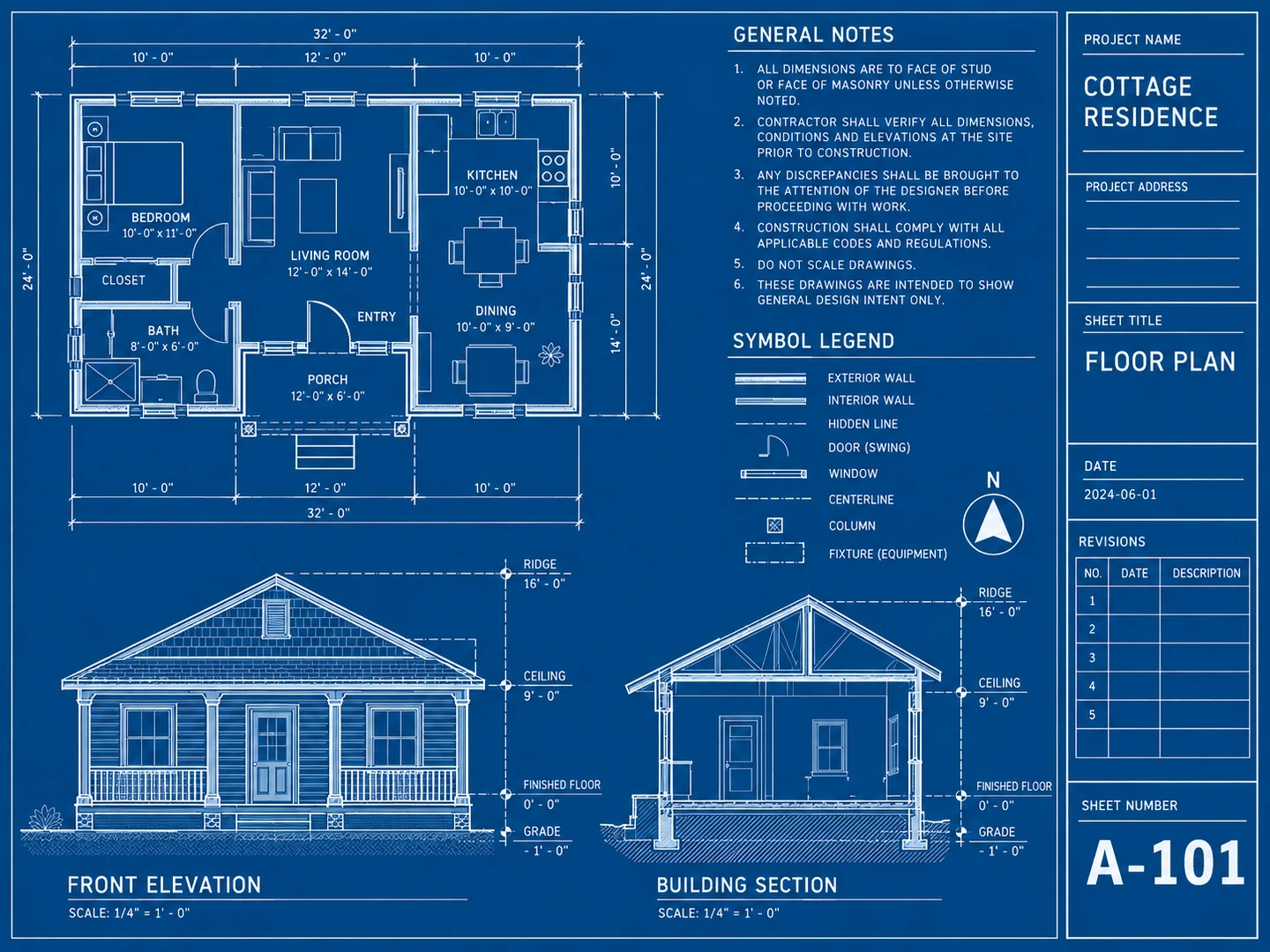
A house set spreads its drawings over several sheets:
| Sheet | What it shows | Typical scale |
|---|---|---|
| Site plan | Lot lines, setbacks, footprint, driveway, utilities | 1 in = 10 or 20 ft |
| Floor plans | Walls, openings, rooms, dimensions, stairs | 1/4 in = 1 ft |
| Exterior elevations | Heights, roof pitch, windows, materials | 1/4 in = 1 ft |
| Building sections | Foundation, framing, ceiling heights, roof | 1/4 or 1/2 in = 1 ft |
| Foundation and framing | Footings, beams, joists, headers | 1/4 in = 1 ft |
| Electrical plan | Outlets, switches, lights, panel | 1/4 in = 1 ft |
| Details and schedules | Close-ups, door and window tables, notes | Larger scales or none |
How to Create a Blueprint for a House
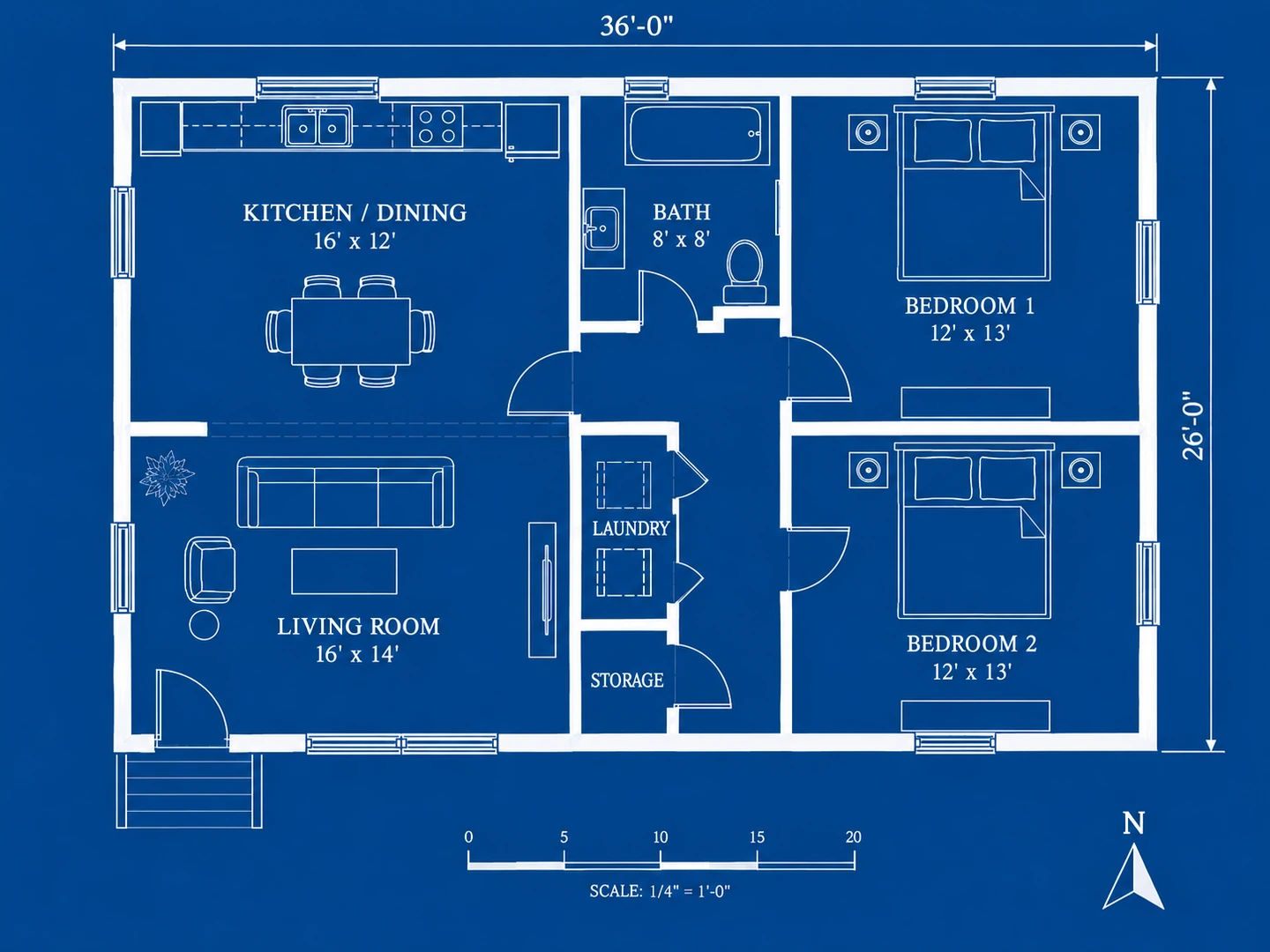
The steps below take one small house from idea to blueprint: a 2-bedroom, 1-bath cottage of about 36 x 26 feet, or 936 square feet. A bigger house follows the same steps with more rooms.
Step 1: Write the Program
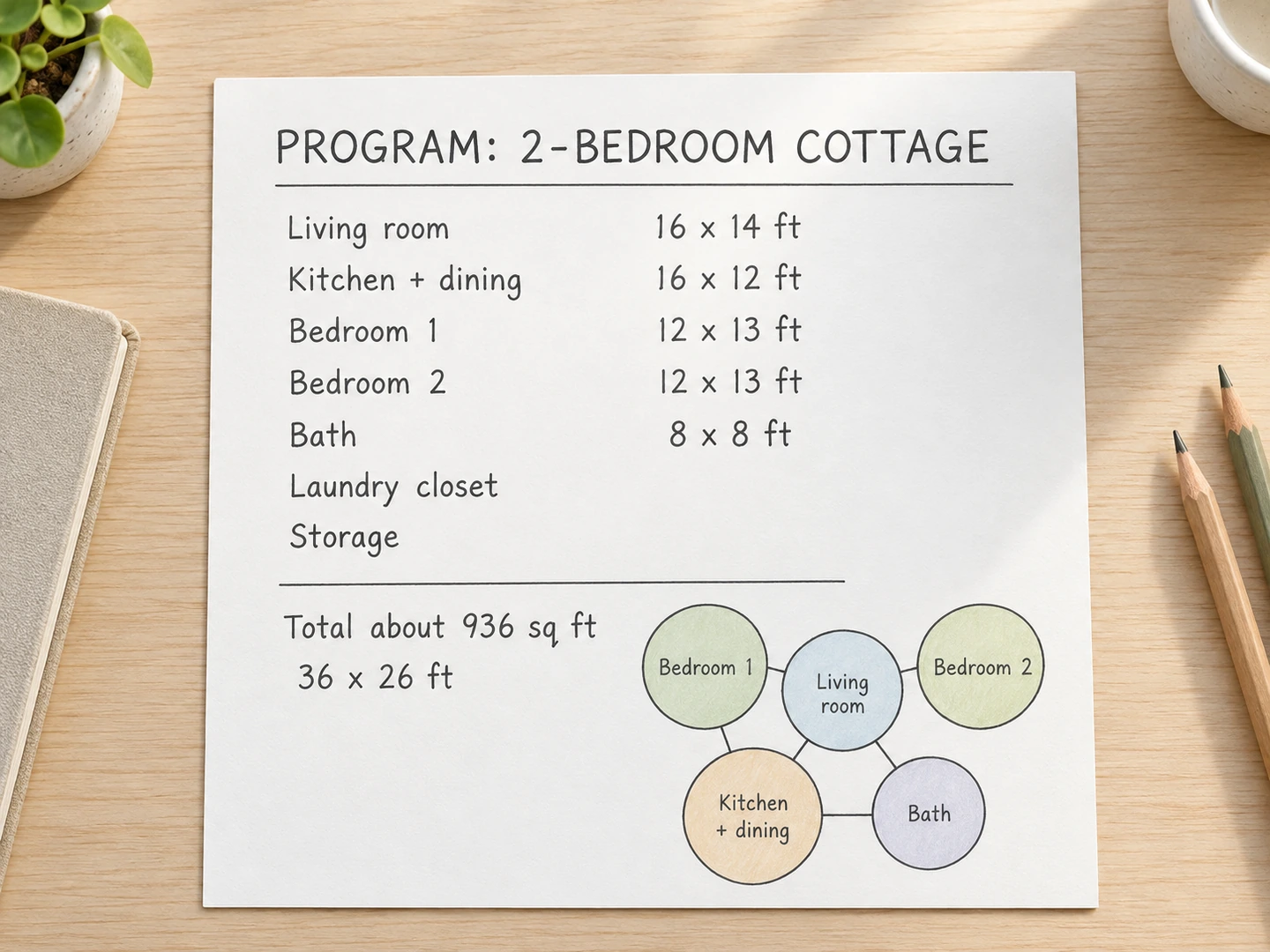
Architects call the brief a program: every space the house needs, its rough size, and which spaces must sit together. Write it before drawing a line, and total the areas to check them against your budget and lot.
Swipe left or right to see the full table →
| Space | Common starting size | Planning note |
|---|---|---|
| Primary bedroom | 12 x 14 to 14 x 16 ft | Plus a walk-in or long reach-in closet |
| Secondary bedroom | 10 x 11 to 12 x 13 ft | IRC minimum room: 70 sq ft, 7 ft each way |
| Full bathroom | 5 x 8 ft | Fits a 60-in tub, toilet and vanity |
| Kitchen | 10 x 12 ft and up | 42-in aisles, 48 in for two cooks (NKBA) |
| Living room | 12 x 16 to 16 x 20 ft | Plan the seating first |
| Laundry | 5 to 6 ft wide closet, or 6 x 8 ft room | A room adds a sink and folding space |
| Two-car garage | 20 x 20 ft min, 24 x 24 ft comfortable | More depth for a workbench |
| Hallway | 36 in min, 42 in comfortable | 36 in is the IRC minimum |
The cottage program: a 16 x 14 ft living room, 16 x 12 ft kitchen and dining, two 12 x 13 ft bedrooms, an 8 x 8 ft bathroom, a laundry closet and storage off a short hall. Living spaces go on the left, bedrooms on the right, with the bathroom between. Walls take a few inches out of each room, so treat the sizes as approximate.
Step 2: Check the Site and the Rules
Collect the constraints that shape the house: a survey showing lot lines, easements and utilities; zoning setbacks, lot coverage and height limits, which together draw the box the house must fit in; and the sun, views, slope and driveway access. Ask the building department which code edition it uses, which drawings it requires and who may prepare them, before you draw. A new house almost always needs a site plan; the site plan maker sketches a concept version from a description.
Step 3: Make a Bubble Diagram, Then a Scaled Sketch
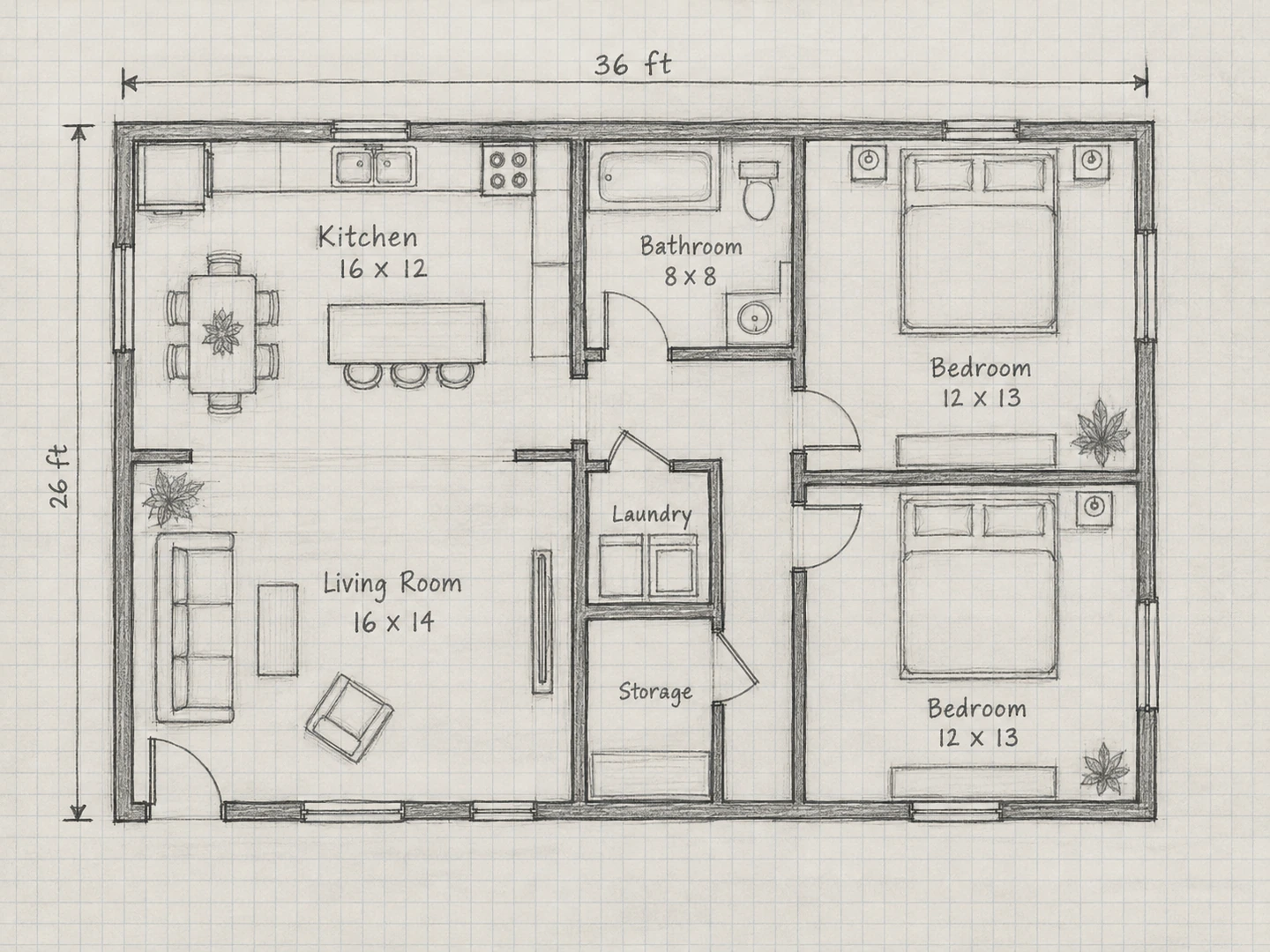
Draw each room as a loose bubble sized to its area and link the ones that must touch: kitchen to dining, dining to living, bedrooms to the bathroom. Shuffle until the links are short and the bedrooms sit away from the front door. Then turn the bubbles into rectangles on graph paper at 1/4 inch = 1 foot, checking sizes, door swings and that every bedroom has an outside wall. How to draw a floor plan covers scale, walls and door swings in detail.
Step 4: Draw the Measured Floor Plan
This is what most people mean by drawing blueprints. Redraw the sketch accurately, with walls at real thickness (about 4½ inches inside, 6 to 8 inches outside), standard door and window symbols, three tiers of dimension strings, room names and sizes, stairs marked UP or DN, a north arrow and the scale.
Check the plan against the model IRC as you go:
- Habitable rooms: at least 70 square feet, 7 feet in each direction, and a ceiling of at least 7 feet (standard ceiling height covers exceptions).
- Hallways: at least 36 inches wide.
- Bedrooms: an emergency escape opening of at least 5.7 square feet net clear (5.0 at grade), at least 24 inches high and 20 inches wide, with the sill no more than 44 inches above the floor.
- Stairs: risers no taller than 7¾ inches and treads at least 10 inches deep; see stair dimensions.
Adding a garage? 2-car garage dimensions gives sizes that leave room to open car doors.
 AfterBefore
Step 5: Add Elevations and a Section
A floor plan shows length and width; elevations and sections show height. Exterior elevations draw each face of the house with the grade line, floor levels, plate height, roof pitch (rise per 12 inches of run, such as 6:12), window and door heights and materials. A building section is a vertical cut, marked on the plan with a section line, showing the foundation, framing, ceiling heights and roof structure.
Project each window and door straight up from the plan, then take heights from the section. The 2D plan to elevation tool generates a concept front elevation from a plan image, a quick way to see the house before drawing it properly.
Step 6: Lay Out the Blueprint Sheet
- Pick sheet size and scale together. At 1/4" = 1'-0" the cottage is 9 x 6½ inches on paper, so one ARCH D sheet holds the plan, an elevation and a section.
- Place the title block along the right edge and fill it in.
- Place each drawing with its title and scale.
- Add the north arrow, general notes and legend.
- Set line weights: walls heaviest, then doors, windows and fixtures, then dimensions and text.
- Letter in capitals at about ⅛ inch high on the printed sheet.
For the classic look, draw white lines on deep blue, or invert colors when you export.
Create a Blueprint Online Free: Your Options
Swipe left or right to see the full table →
| Option | Cost | What you get | Best for |
|---|---|---|---|
| Our blueprint maker | Free signup credits, then 10 credits each | AI blueprint image (PNG) from a sketch or brief | Concepts and presentations |
| Our AI blueprint generator | Free signup credits, then 10 credits each | Blueprint image from a written description | Comparing layouts fast |
| Free CAD (LibreCAD, FreeCAD) | Free, open source | Exact, editable drawings and DXF files | Precise drawings |
| Graph paper | Almost nothing | A hand drawing you can scan | First sketches |
Our blueprint maker turns a photo of your sketch or a written brief into a white-on-blue blueprint with walls, door swings, windows, room labels and dimension strings. No sketch yet? The AI blueprint generator starts from text alone. Both also offer other styles, from Technical 2D to 3D Isometric, take the area in square feet or meters, and keep results in My Projects. They are a quick way to make a blueprint free with signup credits, not CAD programs: for exact, editable drawings, free CAD is worth the learning time.
2-bedroom, 1-bath cottage, about 936 sq ft (36 x 26 ft). Front door into a 16 x 14 ft living room at the front left; 16 x 12 ft kitchen and dining behind it. Two 12 x 13 ft bedrooms on the right. 8 x 8 ft bathroom, laundry closet and storage off a short central hall. Blueprint style with room labels, door swings and overall dimensions.
When You Need a Licensed Professional
Making your own blueprints is legal and useful; whether they can be used for a permit depends on where you build.
- Permits. Building departments generally require drawings for a new house, an addition or a structural change such as removing a bearing wall, and review them against the local code.
- Who may draw them. Some states and cities let homeowners or unlicensed designers prepare plans for a single-family house; others require a licensed architect above a certain size or for some building types.
- Engineering. Beams, foundations, retaining walls and houses in high-wind or seismic areas often need an engineer's calculations or stamp.
- Other documents. Many jurisdictions ask for energy code forms, and roof trusses usually come with engineered drawings from the manufacturer.
Call the building department before you start. Even when a professional draws the final set, a clear program and concept plan give them a solid starting point.
Tips for Making Your Own Blueprints
- For a remodel, draw what exists first, then mark (E) existing and (N) new.
- Use one scale per drawing and write it under the title.
- Dimension each thing once. Duplicate dimensions eventually disagree.
- Make every dimension string add up to the overall length.
- Number every sheet and date every revision.
- Print at 100% and check a few dimensions with a scale ruler before sharing the set.
Frequently asked questions
Sketch the layout on graph paper at 1/4 inch = 1 foot, then redraw it in free CAD such as LibreCAD or FreeCAD if you need exact lines. For a quick concept, our blueprint maker turns a sketch or brief into a blueprint image; new accounts get free credits and each blueprint uses 10 credits.
Yes for planning, and in some places for the permit too. Rules on who may prepare permit drawings vary by state and city, and structural parts often need an engineer, so ask your building department first.
A floor plan is one drawing: the top-down view of one level. A blueprint is the full set of construction drawings, with floor plans plus elevations, sections, a site plan, structural and electrical sheets, schedules and notes.
Floor plans and elevations are usually 1/4 inch = 1 foot, site plans an engineering scale such as 1 inch = 20 feet, and details larger, such as 1½ or 3 inches = 1 foot.
They were copied with the cyanotype process, invented in 1842, which turned the paper blue everywhere except under the drawn lines. Modern plans print black on white, but the name stayed.
AI can draw a blueprint-style image from a description or sketch in seconds, which suits concepts and presentations. The result has approximate dimensions, is not an editable CAD file and is not suitable for permits.
Most offices use CAD or BIM programs such as AutoCAD, Revit, ArchiCAD or Vectorworks. Free options include LibreCAD for 2D drafting and FreeCAD for 2D and 3D.
Try these tools
Sources
- International Residential Code (IRC) — International Code Council
- Kitchen and Bath Planning Guidelines — National Kitchen & Bath Association (NKBA)